Agentic Blockchain Indexing with Envio Cloud
 Jordyn Laurier
- Envio HyperIndex and the
envio-cloudCLI enable end-to-end agentic deployment of blockchain indexers with no manual config. - An AI agent scaffolded, configured, pushed to GitHub, and deployed a wstETH indexer on Monad Mainnet from a single prompt.
- 400,000 events indexed in approximately 20 seconds.
- Every step is CLI-driven and scriptable, with JSON output for downstream agent logic.
Agentic development works best when an AI agent can take a single prompt and run with it, end-to-end, without handing back to a human at every step. For blockchain indexing, that's exactly what we've built at Envio.
With the Envio Cloud CLI (envio-cloud) and HyperIndex, an agent can scaffold a production-ready indexer, configure it for any EVM-compatible chain, push it to GitHub, and deploy it to Envio Cloud, without a human ever touching a config file.
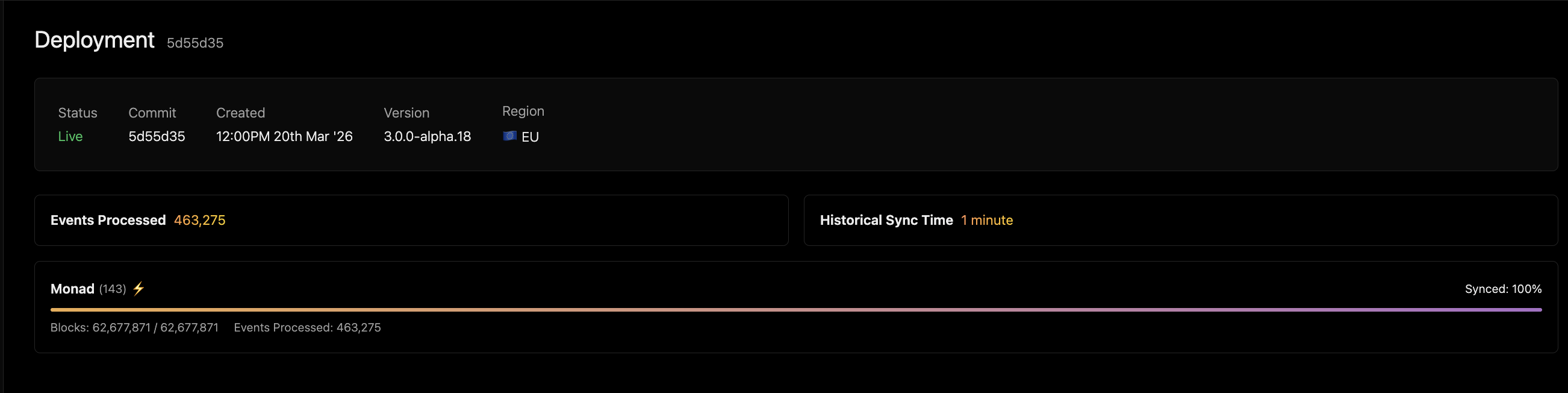
The result: 400,000 events indexed in ~20 seconds
What is HyperIndex?
HyperIndex is Envio's high-performance blockchain indexing framework. It's designed to make indexing fast to build and even faster to run, with support for EVM-compatible networks and a developer experience built around real workflows.
HyperIndex is the default indexing framework for agentic development with the Envio Cloud CLI tool and comprehensive Claude skills. That means when an AI agent needs to spin up a blockchain data pipeline, HyperIndex is the go-to solution.
The Envio Cloud CLI: envio-cloud
The envio-cloud CLI is the command-line interface for Envio Cloud, the managed infrastructure layer that runs your HyperIndex indexers in production.
With it you can:
- Authenticate via GitHub (
envio-cloud login) - Register a new indexer pointing to your GitHub repo (
envio-cloud indexer add) - Monitor sync progress and deployment status in real-time (
envio-cloud deployment status,envio-cloud deployment metrics) - Promote deployments to production (
envio-cloud deployment promote) - Pull JSON output for any command (
-o json), making it fully scriptable and agent-friendly
No dashboard required. Everything that matters is exposed through the CLI.
End-to-End: Agentic deployment of a wstETH indexer on Monad
Here's the full workflow an agent ran to deploy a live ERC20 indexer for wstETH on Monad Mainnet, start to finish.
Step 1: Scaffold the indexer
pnpx envio init template -t erc20 -l typescript -d ./my-indexer
The envio CLI scaffolds a TypeScript ERC20 indexer template. No API token is needed at this stage as authentication is handled through the hosted service at deployment time.
Step 2: Configure for Monad
The agent edits config.yaml to target the wstETH contract on Monad Mainnet (chain ID 143, contract address 0x10Aeaf63194db8d453d4D85a06E5eFE1dd0b5417, start_block: 0).
Then runs codegen and a type check to confirm everything is clean:
pnpm codegen
pnpm tsc --noEmit
Note: the ERC20 template test file references a different contract address and network, so any resulting type errors need to be fixed before the type check passes.
Step 3: Push to GitHub
Create a public repo and push:
gh repo create wsteth-monad-indexer-demo --public
git init && git add . && git commit -m "init"
git push -u origin main
If the push fails because your GitHub token lacks permission to push workflow files (like .github/workflows/test.yaml), refresh auth with workflow scope:
gh auth refresh -s workflow
Envio Cloud deploys from the envio branch by default, so create and push it:
git checkout -b envio && git push -u origin envio
Step 4: Connect the Envio GitHub Bot
The Envio GitHub App must have access to the repo before deployments will trigger. If the repo is not already linked, visit:
https://github.com/apps/envio-deployments/installations/select_target
Then grant the bot access to the wsteth-monad-indexer-demo repository.
Step 5: Deploy
pnpx envio-cloud login
pnpx envio-cloud indexer add
  --name wsteth-monad-indexer-demo
  --repo wsteth-monad-indexer-demo
  --description "wstETH ERC20 indexer on Monad"
  --branch envio
  --skip-repo-check
  --yes
Step 6: Verify
pnpx envio-cloud indexer get wsteth-monad-indexer-demo {org}
pnpx envio-cloud deployment status wsteth-monad-indexer-demo <commit-hash> {org}
Once synced, the indexer is viewable in the browser at https://envio.dev/app/{org}/{indexer-name}/{commit-hash}.
Check the live deployment from this demo here: https://envio.dev/app/denhampreen/wsteth-monad-indexer-demo/5d55d35
400,000 events indexed. ~20 seconds
See the full walkthrough on Loom, covering the complete agent driven workflow from scaffold to deployment.
Why this matters for agentic development
The blockchain data layer has historically been one of the friction points in agentic workflows. Spinning up an indexer meant reading docs, manually editing configs, managing infrastructure, and waiting for sync.
HyperIndex and the envio-cloud CLI change that equation. Every step in the workflow above is scriptable, CLI-driven, and designed to be executed by an agent without human intervention. The JSON output flag (-o json) makes it straightforward to pipe deployment status into downstream logic. The GitHub-native deployment flow means agents that can commit code can deploy indexers.
This is what it looks like in practice for HyperIndex to be the default indexing framework for agentic development.
Getting started
Install the Envio Cloud CLI:
npm install -g envio-cloud
Scaffold your first indexer:
pnpx envio init template -t erc20 -l typescript -d ./my-indexer
Whether you're building on Monad, Ethereum, or any other EVM compatible network, Envio enables agent driven indexing from first prompt to live deployment. The GitHub-native deployment flow means agents that can commit code can deploy indexers in minutes.
Be sure to check out our Envio Docs MCP Server for AI-assisted indexer development.
Frequently Asked Questions
What is agentic blockchain indexing?
Agentic blockchain indexing is the process of using an AI agent to scaffold, configure, and deploy a blockchain indexer without manual human intervention. With Envio HyperIndex and the envio-cloud CLI, an agent can go from a single prompt to a live production indexer in minutes.
What is the envio-cloud CLI?
The envio-cloud CLI is the command-line interface for Envio Cloud, the managed infrastructure layer that runs HyperIndex indexers in production. It supports login, indexer registration, deployment monitoring, and promotion, all scriptable with JSON output via the -o json flag.
How fast is Envio HyperIndex for historical sync?
In independent benchmarks run by Sentio, HyperIndex completed the Uniswap V2 Factory sync in 8 seconds, 142x faster than The Graph and 15x faster than the nearest competitor (Subsquid). In the agentic deployment demo, 400,000 wstETH events on Monad Mainnet were indexed in approximately 20 seconds.
Which chains does Envio support for agentic indexing?
Envio supports any EVM-compatible chain. HyperSync natively covers 79+ EVM chains for maximum speed, including Ethereum, Base, Arbitrum, Optimism, Polygon, and Monad. Any EVM chain without native HyperSync support can be indexed via standard RPC.
How do I get started with agentic indexing on Envio?
Install the Envio Cloud CLI with npm install -g envio-cloud, then scaffold your first indexer with pnpx envio init template -t erc20 -l typescript -d ./my-indexer. Push to GitHub and deploy with the envio-cloud CLI.
About Envio Cloud
Envio Cloud is a managed environment for running HyperIndex indexers in production.
It handles infrastructure, scaling, and monitoring, so indexers can run reliably without managing operational overhead. Multiple plans are available, from free development environments to dedicated production deployments, each with features such as static endpoints, built in alerts, and production ready infrastructure.
Build With Envio
Envio is the fastest independently benchmarked EVM blockchain indexer for querying real-time and historical data (Sentio benchmark, May 2025). If you are building onchain and need indexing that keeps up with your chain, check out the docs, run the benchmarks yourself, and come talk to us about your data needs.
Stay tuned for more updates by subscribing to our newsletter, following us on X, or hopping into our Discord.
Website | X | Discord | Telegram | GitHub | YouTube | Reddit